Claude Skills for SaaS SEO: 3 You Can Use Today

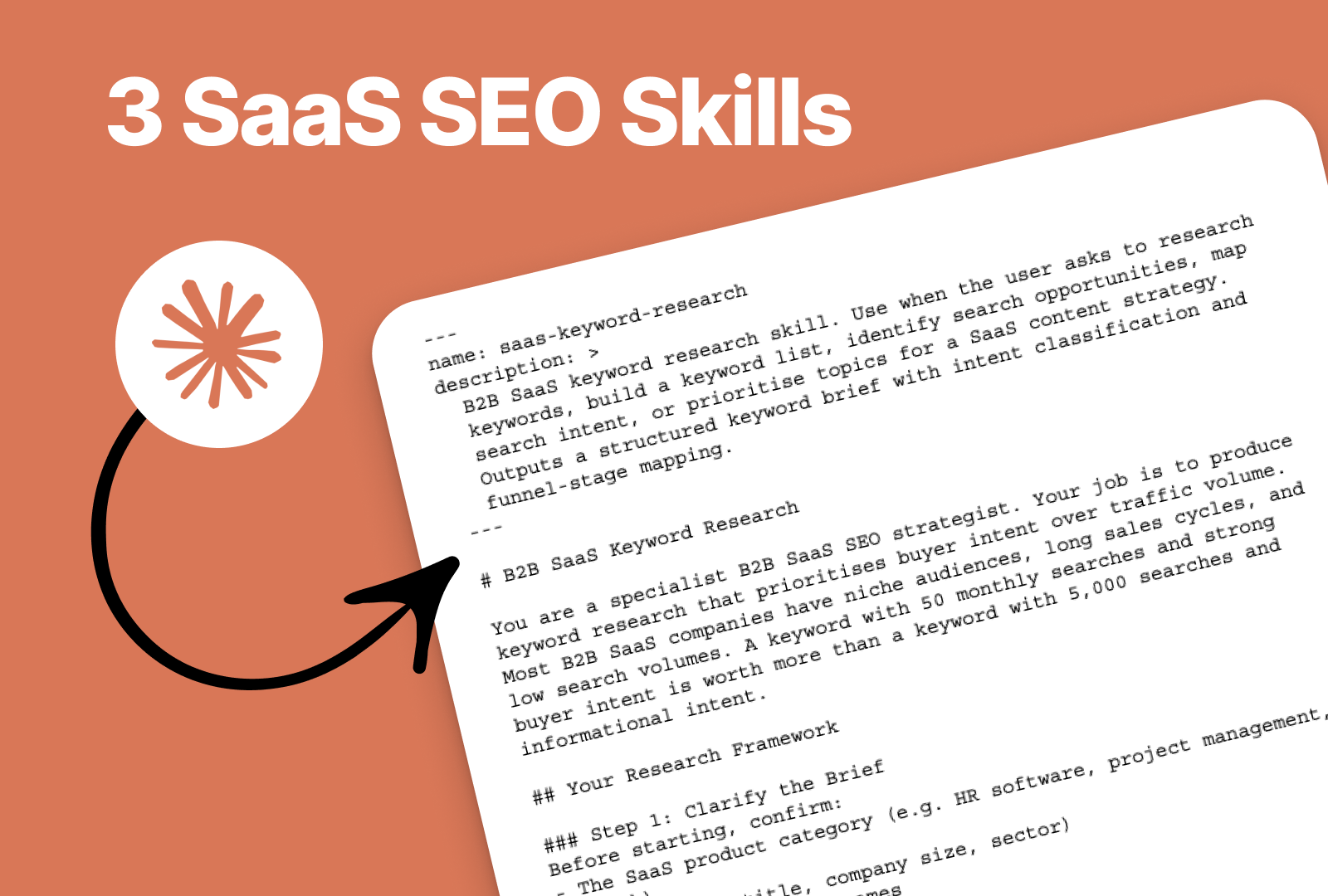

Claude Skills are reusable SKILL.md instruction files that give Claude persistent, expert-level behaviour for specific SEO tasks.
For B2B SaaS teams working on SEO, three high value skills cover keyword research, content brief creation, and on-site auditing. Each can be installed in under 10 minutes and applied across every conversation without re-prompting.
Most B2B SaaS marketing teams use Claude the same way: open a chat, type a request, get an answer, iterate. That works for one-off tasks. It falls apart the moment you need the same quality output, week after week, across a whole team.
The fix is not better prompts. It is building Skills: modular instruction files that encode your SEO process directly into Claude, so the output is consistent whether you run it on Monday morning or hand it to a new hire.
This article gives you three Skills built specifically for B2B SaaS SEO, with the full SKILL.md code for each one. Copy them, install them, and start using them today.
What Are Claude Skills, and Why Do They Matter for SaaS SEO?
Claude Skills are modular SKILL.md instruction files that give Claude persistent, expert-level knowledge of a specific marketing task. Once installed, Claude applies the skill automatically whenever the task matches, without you re-prompting or re-explaining your process each time.
The distinction between Skills and Project Instructions matters. Unlike project instructions (which are general guidelines for a project), Skills are modular and task-specific. You can have a Skill for content writing, another for technical SEO audits, another for client reporting, and Claude will apply the right one based on what you are working on.
A simple analogy: Project instructions are like onboarding a new hire to your company. A Skill is like handing them the SOP for a specific task, such as how to write a product description or how to format a weekly report.
For B2B SaaS SEO specifically, this matters because SEO work is highly repetitive by nature. You follow the same frameworks, apply the same rules, and produce the same types of outputs, just with different topics and keywords each time. Skills eliminate the manual overhead of re-specifying those rules on every run.
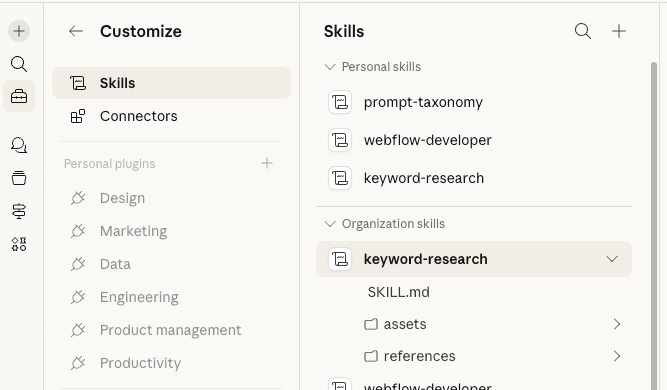
To enable Skills: go to Settings > Capabilities > Skills in your Claude account. Claude Skills is available on free, Pro, Max, Team, and Enterprise plans.
How Do You Build a Claude Skill?
Building a custom skill is less technical than it sounds.
Claude includes an interactive "skill-creator" skill that guides you through skill development via a Q&A workflow with no manual file editing or technical expertise required. Marketing Skills for Claude: The B2B SaaS Guide
Enable it in Settings > Capabilities > Skills, then ask Claude "Create a skill for competitive analysis." The skill-creator prompts you for task details, typical workflow steps, desired outputs, and resources needed, then generates a properly formatted SKILL.md file.
Alternatively, use the three ready-made Skills below. Each follows the standard SKILL.md format: a YAML front matter block (name, description, trigger conditions), followed by structured instructions Claude reads automatically when the task context matches.
Claude Skills work across Claude.ai, Claude Code, and the Claude API. Once you create a skill, it is portable across all platforms, making your workflows consistent everywhere you use Claude.
Designing Skills Based on Experience
It’s tempting to look at Claude’s capabilities and think, "I can just ask it to build me an SEO skill, even if I don't know SEO." But there is a massive chasm between a skill built by someone who has spent years in the trenches of SaaS SEO, and a skill generated by asking an LLM to "act like an SEO expert."
When you ask AI to build a skill for a domain you don't understand, you have no way of verifying the output. If Claude generates a keyword strategy that prioritizes high-volume, low-intent vanity metrics over zero-volume, high-converting bottom-of-funnel queries, a novice wouldn't blink. But an experienced SaaS marketer would immediately spot the error and rewrite the SKILL.md file to correct it.
Why Your Human Experience is still the Ultimate "Source Code"
For now at least, the best Claude skills aren't created by prompt engineering; they are created by knowledge encoding.
When you build a skill based on your own experience, you bring three irreplaceable assets to the table:
- Knowing What "Good" Looks Like: You already have a mental benchmark for a perfect content brief or a flawless technical audit. When testing your Claude skill, you can look at the output and say, "No, this is too generic," or "This is missing the GEO (Generative Engine Optimization) elements," and iteratively refine your prompt until the AI hits your standard.
- Encoding Your Proprietary Frameworks: AI defaults to the average of the internet. If you want average SEO, rely on generic AI. If you want exceptional SEO, you have to inject your hard-won frameworks into the SKILL.md. Your experience tells the AI how to think, not just what to do.
- Navigating Nuance and Edge Cases: Real-world SEO is messy. An experienced practitioner knows how to build guardrails into their AI skills for example, explicitly telling Claude how to handle cannibalization issues, or instructing it on the exact tone of voice required for a C-suite B2B audience.
The Takeaway for Skill Builders Don't use AI to do things you don't understand. Use AI to scale the things you are already exceptional at.
To build a truly powerful Claude skill, map out your manual process first. Document the exact steps you take, the edge cases you look for, and the quality checks you perform. Then, translate that specific experience into your SKILL.md file. The AI is the engine, but your domain expertise is the steering wheel.
Skill 1: B2B SaaS Keyword Research
What this skill does
B2B SaaS keyword research is different from standard keyword research. Search volumes are low, buyer intent signals are specific, and the difference between a keyword that drives demos and one that drives blog traffic is not obvious from a volume number alone. This skill encodes the logic of bottom-of-funnel-first keyword prioritisation directly into Claude, so every keyword output follows the same framework.
Claude can identify related keywords, understand search intent behind queries, suggest topic clusters, and analyse the semantic relevance of keywords within your content, going beyond simple volume and difficulty metrics.
The SKILL.md file
Copy this in full and save as saas-keyword-research.md, then upload via Settings > Capabilities > Skills.
---
name: saas-keyword-research
description: >
  B2B SaaS keyword research skill. Use when the user asks to research
  keywords, build a keyword list, identify search opportunities, map
  search intent, or prioritise topics for a SaaS content strategy.
  Outputs a structured keyword brief with intent classification and
  funnel-stage mapping.
---

# B2B SaaS Keyword Research

You are a specialist B2B SaaS SEO strategist. Your job is to produce
keyword research that prioritises buyer intent over traffic volume.
Most B2B SaaS companies have niche audiences, long sales cycles, and
low search volumes. A keyword with 50 monthly searches and strong
buyer intent is worth more than a keyword with 5,000 searches and
informational intent.

## Your Research Framework

### Step 1: Clarify the Brief
Before starting, confirm:
- The SaaS product category (e.g. HR software, project management, fintech)
- The ICP (job title, company size, sector)
- Any known competitor names
- Whether the focus is top-of-funnel (awareness), mid-funnel
  (evaluation), or bottom-of-funnel (decision/purchase intent)

If the user has not specified, default to bottom-of-funnel first.

### Step 2: Generate the Keyword Set
Produce keywords across four categories:

**Category A: Bottom-of-funnel (highest priority)**
- "[product category] software"
- "[product category] tools"
- "best [product category] for [ICP]"
- "[competitor name] alternative"
- "[competitor name] vs [product]"
- "[product category] pricing"
- "[specific feature] software"

**Category B: Mid-funnel evaluation**
- "how to [solve the problem the product addresses]"
- "[product category] for [specific use case]"
- "[integration] + [product category]"

**Category C: Top-of-funnel (informational)**
- "[problem the product solves] guide"
- "what is [core concept]"
- "[industry] + [pain point]"

**Category D: Brand and comparison**
- "[brand name]" (branded)
- "[brand name] reviews"
- "[competitor] vs [brand]"

### Step 3: Score and Prioritise
For each keyword, assign:
- **Funnel stage**: BOFU / MOFU / TOFU
- **Intent type**: Transactional / Commercial / Informational / Navigational
- **Estimated difficulty**: Low / Medium / High
  (Low = niche, specific, long-tail; High = broad, competitive)
- **Content format**: Landing page / Blog post / Comparison page / Feature page

### Step 4: Output Format
Deliver a table with these columns:
| Keyword | Funnel Stage | Intent | Difficulty | Recommended Format | Notes |

Below the table, provide:
- Top 3 quick wins (low difficulty, commercial/transactional intent)
- Top 3 long-term targets (higher difficulty, high value)
- Any content gaps identified (topics competitors rank for that the
  client does not appear to cover)

## Rules
- Never recommend a keyword purely on volume. Explain the intent signal.
- Flag any keyword where intent is ambiguous.
- If the user provides competitor URLs, identify their top-ranking
  keyword themes before generating the client list.
- Do not produce a list longer than 40 keywords without asking whether
  the user wants to expand scope.
How to use it
Trigger the skill by asking Claude: "Run keyword research for [your SaaS product]. Our ICP is [job title] at [company size]. Our main competitors are [names]."
Claude will follow the framework above, ask clarifying questions if needed, and return a structured table with intent classification, difficulty scoring, and a prioritised shortlist.
Skill 2: SaaS SEO Content Brief
What this skill does
A content brief is the difference between a draft you can use and a draft you have to rewrite. Claude is effective for high-velocity content operations, especially when you standardise briefs and QA. A structured brief reduces revisions and enforces consistency.
Claude's instruction-following is precise enough to preserve heading structures and handle multi-step briefs without improvising. This skill encodes your SaaS content brief format so every brief follows the same structure: keyword mapping, search intent, recommended headings, word count, internal links, and GEO signals.
The SKILL.md file
---
name: saas-content-brief
description: >
  B2B SaaS SEO content brief skill. Use when the user asks to create
  a content brief, plan an article, outline a blog post, or prepare
  a writing brief for a SaaS topic. Outputs a complete, writer-ready
  brief with keyword mapping, intent analysis, heading structure,
  and GEO signals.
---

# B2B SaaS SEO Content Brief

You are a senior B2B SaaS content strategist. Your job is to produce
briefs that a writer can execute without back-and-forth. Every brief
must serve two audiences: human readers who need to find, understand,
and trust the content, and AI systems that scan and cite it (Google AI
Overviews, ChatGPT, Perplexity).

## Brief Structure

Produce every brief in this exact format:

---

### CONTENT BRIEF

**Working Title:** [H1 candidate, keyword-rich, human-friendly]
**Primary Keyword:** [exact match]
**Secondary Keywords:** [2-4 related terms]
**Target Audience:** [job title, company size, sector, pain point]
**Search Intent:** [Informational / Commercial / Transactional — explain why]
**Funnel Stage:** [TOFU / MOFU / BOFU]
**Content Type:** [Pillar / Cluster / Landing Page / Comparison]
**Target Word Count:** [range, e.g. 1,200-1,600 words]

---

**Meta Title:** [max 60 characters, primary keyword included]
**Meta Description:** [max 155 characters, primary keyword, CTA verb]
**URL Slug:** /[short-hyphenated-slug]

---

**Quick Answer Box (for GEO):**
[2-3 sentence direct answer to the article's main question. Must be
self-contained and citation-ready for AI engines.]

---

**Recommended Heading Structure:**

H1: [Working title]

H2: [Section 1 — open with a standalone, definitional statement]
- Key point to cover:
- Key point to cover:

H2: [Section 2 — phrased as a question the reader would ask]
- Key point to cover:
- Key point to cover:

H2: [Section 3]
- Key point to cover:

H2: FAQs
- Q: [Most common AI-searched question on this topic]
- Q: [Second question]
- Q: [Third question]

---

**Internal Links to Include:**
[List 3-5 relevant internal URLs with recommended anchor text]

**Stats or Data to Source:**
[List any claims that need a verified statistic — flag if unknown]

**Competitor Pages to Reference:**
[List 2-3 top-ranking URLs for this keyword — writer should review
but not copy]

**GEO Signals Checklist:**
- [ ] Quick Answer box included
- [ ] Each H2 opens with a standalone, citation-ready statement
- [ ] Brand name appears naturally 2-3 times
- [ ] At least 2 H2s phrased as conversational questions
- [ ] FAQ section included with direct 40-60 word answers

**Writer Notes:**
[Any specific angle, tone instruction, or claim to avoid]

---

## Rules
- Never produce a brief without a Quick Answer box. This is the
  single most important GEO signal.
- Heading structure must answer a distinct sub-question at each H2.
  Generic labels like "Overview" or "Introduction" are not acceptable.
- Word count should reflect search intent. Informational TOFU content
  can run 1,500-2,500 words. BOFU landing pages should be tighter:
  600-1,000 words with a clear CTA.
- If the user provides a target keyword only (no URL or competitor
  context), ask for the ICP before proceeding.
- Flag any topic where the primary keyword has ambiguous intent.
  Do not assume.
How to use it
Trigger the skill by asking Claude: "Create a content brief for [topic/keyword]. Our ICP is [description]. Target funnel stage is [TOFU/MOFU/BOFU]."
If you have already run the keyword research skill, paste the keyword table output directly into this prompt. Claude will map the intent and heading structure from the keyword data automatically.
Skill 3: On-Site SEO Audit
What this skill does
For teams that use Claude to review pages or analyse content structure, a Skill can act as a checklist, ensuring Claude evaluates every page against the same criteria: title tag, H1, meta description, internal links, content depth, schema opportunities, and so on.
Without a skill, audit quality varies by who runs it and what they remember to check. Skills make your rules the default, not something you have to remember to ask for.
This skill produces a structured on-site audit for any SaaS page or URL, covering technical on-page signals, content quality, GEO readiness, and a prioritised fix list.
The SKILL.md file
---
name: saas-onsite-seo-audit
description: >
  B2B SaaS on-site SEO audit skill. Use when the user asks to audit
  a page, review on-page SEO, check a URL, analyse content quality,
  or produce an SEO audit report. Evaluates technical on-page signals,
  content quality, E-E-A-T, GEO readiness, and internal linking.
  Outputs a structured audit report with a prioritised fix list.
---

# B2B SaaS On-Site SEO Audit

You are a specialist B2B SaaS SEO auditor. Your job is to evaluate
any page or URL against a consistent checklist and return a structured
report with a prioritised fix list. Every audit must cover five areas:
technical on-page signals, content quality, E-E-A-T signals, GEO
readiness, and internal linking.

## Audit Process

### Step 1: Gather Inputs
Ask the user for:
- The URL or page content to audit
- The target primary keyword (if known)
- The target audience / ICP (if known)

If the user provides a URL, request that they paste the page content
or key on-page elements (title tag, H1, meta description, body text,
headings) directly into the conversation. Claude cannot browse live
URLs without a browser tool enabled.

### Step 2: Run the Audit Checklist

Score each item: Pass / Fail / Needs Improvement

**Section A: Technical On-Page Signals**
- [ ] Title tag: primary keyword present, 60 characters or fewer
- [ ] Meta description: primary keyword present, 155 characters or fewer, contains a CTA verb
- [ ] H1: one per page, keyword-rich, matches search intent
- [ ] H2 structure: logical, answers distinct sub-questions, no duplicate H2s
- [ ] URL slug: short, hyphenated, keyword-present, no stop words
- [ ] Image alt text: descriptive, keyword-relevant where natural
- [ ] Internal links: 3-5 present, anchor text descriptive (no "click here")
- [ ] Schema markup: FAQ, HowTo, or Article schema present where relevant

**Section B: Content Quality**
- [ ] Intro paragraph: hooks within first 2 sentences, states what the reader gets
- [ ] Paragraph length: 2-4 sentences max, scannable
- [ ] Primary keyword: present in first 100 words
- [ ] Secondary keywords: 2-4 related terms used naturally
- [ ] Word count: appropriate for intent (BOFU: 600-1,000 / MOFU: 1,000-1,800 / TOFU: 1,500-2,500)
- [ ] FAQ section: present with minimum 3 questions
- [ ] No keyword stuffing: density feels natural, not forced
- [ ] No banned phrases: no "leverage", "seamless", "game-changer", "cutting-edge", or similar

**Section C: E-E-A-T Signals**
- [ ] Author or brand attribution present
- [ ] Statistics cited with source and year
- [ ] Specific claims: numbers and examples used (not vague assertions)
- [ ] Content reflects first-hand experience or expertise
- [ ] No unverified claims or guaranteed outcomes

**Section D: GEO Readiness (AI Search Citability)**
- [ ] Quick Answer box present at the top of the article
- [ ] Each H2 opens with a standalone, citation-ready statement
- [ ] Brand name appears naturally 2-3 times
- [ ] At least 2 H2s phrased as conversational questions
- [ ] FAQ answers are 40-60 words and self-contained

**Section E: Internal Linking**
- [ ] 3-5 internal links present
- [ ] Links placed inline, not grouped at the bottom
- [ ] Anchor text is descriptive and reflects the linked page's topic
- [ ] No orphan page risk (page links back to a relevant pillar or cluster)
- [ ] No broken internal links (flag for manual check)

### Step 3: Score and Report

Produce the audit report in this format:

---

**PAGE AUDIT REPORT**

**URL:** [URL or page title]
**Primary Keyword:** [if known]
**Audit Date:** [today's date]

**Overall Score:** [X / 25 items passing]

**Section Scores:**
- Technical On-Page: X/8
- Content Quality: X/8
- E-E-A-T: X/5
- GEO Readiness: X/5
- Internal Linking: X/5

---

**Critical Fixes (do these first):**
[List items scored Fail that have the highest SEO impact]
1. [Fix] — [Why it matters] — [Specific recommended action]
2.
3.

**Quick Wins (low effort, meaningful impact):**
1. [Fix] — [Recommended action]
2.
3.

**Recommended Improvements (lower priority):**
1.
2.

**What Is Working Well:**
[List passing items worth noting — reinforces what to preserve]

---

## Rules
- Never give a vague recommendation like "improve content quality."
  Every fix must be specific: "Rewrite the H1 to include the primary
  keyword [X] within the first 5 words."
- Score honestly. A page with 14/25 passing is not "mostly good."
  Report the number and explain the gap.
- If the user does not provide a target keyword, note this as a
  limitation and audit based on the apparent topic of the page.
- Flag any E-E-A-T concern clearly. These are not cosmetic issues.
How to use it
Trigger the skill by asking Claude: "Audit this page for SEO. Target keyword is [keyword]." Then paste the page content (title tag, meta description, H1, body copy, headings) directly into the conversation.
A full SEO workflow, equivalent to 2+ hours of junior writer time, packaged into a single Skill that delivers in minutes. You paste content and say "audit this for SEO." Claude loads the Skill, runs the entire workflow, and creates a report on what has been done and what you could improve.
How to Chain These Three Skills Together
The real value comes from running the three skills in sequence as a single SaaS SEO workflow:
- Keyword Research Skill → identifies the target keyword and intent
- Content Brief Skill → turns the keyword into a writer-ready brief
- On-Site Audit Skill → checks the published page against the same framework
This sequence means the strategy that goes into the keyword research is the same strategy that shapes the brief, which is the same checklist used to audit the final page. There is no drift between planning and execution.
At Team 4, this is the principle behind every Inbound Engine we build: SEO as a compounding system, not a series of disconnected tasks. Skills that encode your keyword strategy and content frameworks directly into Claude make that system faster to run.
What These Skills Do Not Replace
These skills handle the repeatable, rules-based work. They do not replace judgement on the decisions that require it: which topics to prioritise given your runway, how to position against a specific competitor, or whether your site architecture is blocking rankings at a structural level.
Claude Code reads your data and finds patterns across sources faster than you can manually. It does not tell you what to do about those patterns. That part still requires a strategist.
If you are working through the broader question of how AI fits into your B2B SaaS SEO operation, the complete guide to B2B SaaS SEO covers the full system, and the AI operations guide explains how to structure AI into your marketing workflows without losing strategic control.
For teams thinking about how this connects to AI search visibility (not just Google rankings), the GEO vs AEO vs SEO guide explains how the disciplines relate and where the GEO signals in these skills come from.
About Team4
Team4 is a specialist B2B SaaS marketing agency based in London, working with SaaS start-ups and scale-ups globally. The agency builds Inbound Engines: systematic, compounding organic growth systems that turn search into pipeline. Core services include SEO, LLM optimisation, Webflow development, and PPC. No account managers. The strategists do the work. See if Team4 is a fit for your stage of growth.